Sponsored Links
Excel Functions

VLOOKUP function gives #N/A or #REF!

The VLOOKUP function is a very useful function for handling data, but many of you may have experienced that once you get stuck in the error swamp of #N/A or #REF! In this article, we will discuss how to use the VLOOKUP function to get rid of the #N/A and #REF!
Edge

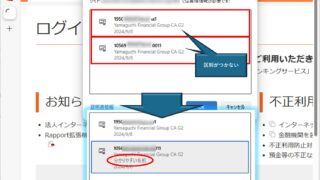
How to Change Digital Certificate Display Names in Microsoft Edge for Easy Identification

How to Change Digital Certificate Names in Edge | Stop Certificate Confusion. Set friendly names for easy identification. Step-by-step guide to distinguish multiple certificates in Microsoft Edge browser.
Excel Functions

How to set and remove sheet and book protection Excel (Excel)

If you are thinking about preventing Excel mishaps, this is a must! This article details how to set up and remove sheet and book protection. In fact, you can easily set it with a password. This article will help you protect your important data.
Excel Macro (VBA)

[Forgot Password] How to Remove VBA (Macro) Passwords in Excel

A must-read for anyone who has forgotten their Excel password! This article explains in detail how to forcibly remove VBA passwords. In fact, you can easily remove it just by changing the file extension. By reading this article, you can escape read-only mode.
Excel Functions

Excel: Color Cells When Input Doesn’t Match Dropdown List

In this article, you'll learn how to use conditional formatting in Excel to automatically change cell colors when a value entered doesn't match the dropdown list. If you've been struggling with errors during data aggregation using the VLOOKUP function, you're not alone. Fortunately, combining the MATCH and ISNA functions offers a simple and effective solution.
Sponsored Links
en_USEnglish
Copied title and URL