

You use Excel in your daily work. But,I'm good at Excel.That skill, you can really say it's...Job marketCan this be used there?
Many of us learned the basics of Excel in new employee training and use it in our daily work. It may be true that entering formulas, creating charts, and using pivot tables have become commonplace. But can we really say we "can use Excel" with just that?
Actually, many company recruiters say in unison, "Being able to use Excel is a given these days. What we're looking for isPeople who can use Excel as a "weapon"is
A counselor at a career counseling company that has been involved in skill assessment for business professionals for over 20 years states, "The criteria for evaluating Excel skills are becoming more advanced each year. Previously, simply being able to use functions was enough for evaluation, but now, the ability to utilize Excel for business improvement and data analysis is required."
This article will introduce you to what "useful Excel skills" are truly valued in the job market, how to apply them in actual work, and how to appeal those skills, with specific examples.
Your small daily efforts might actually become a powerful weapon. After reading this article, you will surely be able to approach Excel from a new perspective.
▼We will answer questions like these
- What Excel skills are evaluated in a job interview?
- How to objectively evaluate your Excel skills
- Tips for effectively showcasing your Excel skills in an interview
- Skill Improvement Techniques You Can Start Tomorrow
- Chapter 1: "I can use Excel" is outdated!
- Chapter 2: How to Showcase Your Excel Skills to Ace Your Job Interview
- Chapter 3: Practical Use Cases for Excel Skills
- Chapter 4: Impress the Interviewer! How to Prove Your Excel Skills
- In conclusion: Excel Skill Improvement Techniques You Can Start Tomorrow!
Chapter 1: "I can use Excel" is outdated!

"Real Excel Skills" Valued in the Job Market
In the current job market, "being able to use Excel" is a given. What interviewers want to know is "what you've done with Excel" and "what results you've achieved."
For example:
- Common example"I used Excel for daily reports and expense reimbursements." → That won't cut it. You're no different from a rookie.
- Valuable exampleCreated a macro to automate sales reporting for the department, reducing an 8-hour monthly task to 30 minutes. Received high praise from my superior, and the macro was adopted by other departments. → This demonstrates concrete achievements and a positive impact on others.
Your "common sense" Excel skills might actually be your "weapon."
Your Excel skills have surely evolved compared to when you were a new employee.
- What people do after overcoming the "three-year hurdle":
- Streamlining aggregation tasks using Pivot Tables
- Data matching using the VLOOKUP function
- Creating Easy-to-Understand Materials Using Graphs and Conditional Formatting
These are, in fact,Skills many companies wantWhat is it!
Chapter 2: How to Showcase Your Excel Skills to Ace Your Job Interview

Objective methods for evaluating skill levels
First, let's accurately assess your level.
- Beginner (1-2 years of experience in the company):
- You can use the SUM and AVERAGE functions.
- Autofill and simple graphing capabilities → These alone may be insufficient for a job change...
- Intermediate (3-5 years of experience):
- I can master VLOOKUP and IF functions.
- You can freely aggregate data with pivot tables.
At this level,selling pointsIt will be!
- Advanced (able to lead business reform):
- You can automate business tasks with macros and VBA.
- Can do data manipulation using Power Query
If you can do this, you'll be a [ ] in the job market.Valuable human resourcesis!
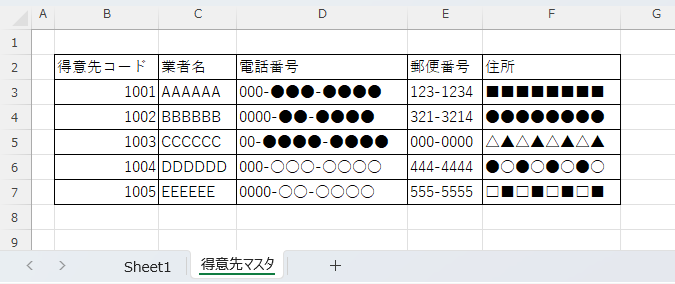
Practical Excel Skill Phrases Collection
Here are common interview questions and effective sample answers.
Q: "What specific Excel skills do you have?"
❌ Bad example: "I use Excel every day, so I can use all the basic functions." → Lacks specificity and is not memorable.
⭕ Good example: "In my previous role, I was responsible for creating weekly sales meeting materials. I consolidated sales data from each salesperson using VLOOKUP and automated analysis by product category and region using pivot tables. Furthermore, I visualized the target achievement rate with conditional formatting, making performance instantly understandable. This initiative was well-received and led to company-wide implementation." → This clearly conveys specific skills and the results they produced.
Chapter 3: Practical Use Cases for Excel Skills

Haven't you had an experience like this?
Case 1: Improving the Daily Sales Report
In the case of Tanaka, who is in her second year at the company:
Tanaka-san used to manually compile sales data sent by email from each store daily.
One day, I created a sheet that automatically aggregates data using the VLOOKUP function and PivotTables.
Work time was reduced from 1 hour to 10 minutes, and my boss highly praised me!
Case 2: Streamlining Inventory Management
In the case of Sato, who works in sales support:
To prevent customers from losing opportunities due to stockouts, we are utilizing the IF function and conditional formatting.
When I set it up so that inventory displays red automatically when it falls below the standard value,
Out-of-stock incidents decreased from an average of 10 per month to 1!
How to Turn Your Experience into "Weapons for Career Change"
- Quantification:
- Reduction rate of working hours
- Cost savings
- Productivity improvement rate
- Scope of impact:
- Only within the department? Company-wide?
- Was it deployed to other departments as well?
- Evaluation:
- What kind of evaluation did you receive from your boss?
- Were there any internal awards or recognitions?
Case 1: Improving the Daily Sales Report
Effective Ways to Make a Good Impression in an Interview:
- Showcase your problem-solving skills
- I questioned the current situation where I spend an hour manually compiling data every day.
- "I felt that the fact the entire team was spending more than 20 hours a month on routine tasks was a problem."
- Emphasize proactivity and initiative.
- "I consulted with my supervisor and received approval to proceed with this as an improvement project."
- "First, we interviewed our colleagues to determine the ideal format for the forms."
- Technical skills and problem-solving abilities
- Example to avoid: "I used VLOOKUP and pivot tables."
- By automating data synchronization, we eliminated manual data entry errors and improved analysis accuracy.
- Presenting the effects with numbers
- Reduced work time from 1 hour to 10 minutes, saving 240 man-hours annually.
- "The time saved allowed us to focus on customer follow-up, resulting in a 51% increase in repeat business."
- Demonstrate applicability and expandability
- "This system has been adopted by other departments as well, contributing to a company-wide reduction of more than 1,000 hours of man-hours per year."
- "This experience opened my eyes to the appeal of process improvement, and I have continued to propose various improvements ever since."
Anticipated questions and model answers:
Q1: "Why did you come up with that improvement?"
CopyA: It started when I was asked to cover for a senior colleague who was an Excel expert while they were on vacation.
Even following the instruction manual, the tasks took a long time, and I realized how difficult the work was for my colleagues who did it every day.
I thought, "If I can systematize it, anyone should be able to do it easily," and I started working on improvements.
Q2: "What specific measures did you take?"
CopyThe most innovative aspect of the design is that it was created from the user's perspective.
For example, we simplified the operation procedure to three steps, allowing for updates with a single button.
Additionally, we designed clear error messages so that even employees with little experience can use the system.
Case 2: Streamlining Inventory Management
Effective Ways to Make a Good Impression in an Interview:
- Emphasize business impact
- We focused on the problem of losing 1 million yen per month due to stockouts.
- We aimed to simultaneously improve customer satisfaction and reduce costs.
- Showcase analytical skills
- We analyzed three months of data and identified patterns that lead to stockouts.
- We set more precise reorder points, taking into account peak and off-peak seasons and weather conditions.
- Demonstrate cooperation and ability to engage others
- We aimed to create a user-friendly tool by communicating closely with the sales representatives in the field.
- We coordinated with the IT department and designed it with future systemization in mind.
- Show concrete achievements with numbers
- "Reduced stockouts by 90% (from 10 per month to 1) and improved customer satisfaction by 15 points."
- Achieve optimal inventory levels and reduce inventory holding costs by 3 million yen annually.
Anticipated questions and model answers:
Q1: "Why did you choose to use Excel to solve this?"
CopyA: There are three reasons.
The first is that a swift response was necessary. This was a problem that would have taken over half a year with system development.
The second is to flexibly accommodate customization requests from the field.
The third is cost. A new system would have cost over 10 million yen, but we could handle it with existing resources using Excel.
Q2: "What did you learn from this improvement experience?"
CopyFrom a technical standpoint, I realized the vast possibilities of Excel.
However, I learned that it's even more important to thoroughly understand the challenges faced by the field.
Tools are the means, and the goal is always to improve operations and customer satisfaction.
I want to leverage this experience to contribute to solving field challenges at your company.
3 Key Points to Win Over the Interviewer
- To give it a story
- Problem discovery → Analysis → Solution planning → Execution → Effectiveness measurement
- Start with "Why was that improvement necessary?"
- Use numbers effectively
- Show before/after with specific numbers
- Provide monetary equivalences for the effects whenever possible.
- Emphasize the bridge between technology and business.
- Demonstrate a perspective as a business problem solver, not just a technical skill set
- Highlight problem-solving skills, not Excel skills.
By mastering these examples and key selling points, your Excel skills will transform from "mere PC skills" into "proof of problem-solving ability." This should enable you to make a persuasive appeal that leaves a strong impression on interviewers.
Chapter 4: Impress the Interviewer! How to Prove Your Excel Skills

How to specifically explain work experience
Episode creation using the PREP method
Point (Conclusion): "We reduced the time required to create monthly reports by 851 TP3T using Excel."
Reason: Because it took a lot of time to manually combine data submitted in different formats from each department.
Example: "I automated data integration using VBA (macros) and made it possible to automatically consolidate with pivot tables and create charts."
Point: As a result, work that used to take three days can now be completed in half a day, allowing us more time for analysis.
Recommendation for Demonstrations Using Simulated Data
Before an interview, preparing in these ways can be effective:
- Create a reproduced version of the Excel file used in practice (When doing so, be sure to delete or modify any confidential information!)
- Bring your laptop and offer to show them, "I can actually show you." (Even if the interviewer doesn't show interest, your preparation will be a plus.)
- Focus on key points so you can explain them in about 3 minutes (too long will bore the interviewer).
In conclusion: Excel Skill Improvement Techniques You Can Start Tomorrow!
Before you start your job search, let's hone your Excel skills at your current workplace.

Skill improvement measures you can start today:
- Review existing business operations
- Are there any manual aggregation tasks?
- Aren't there any graphs that you create the same way every time? That's an opportunity for automation!
- Create dummy data for study.
- Even if you can't use actual business data, you can still practice by creating similar data.
- Try out the function I found online
- Honing skills through side hustles or side activities
- Help a friend's small company with its accounting
- Volunteer to be the treasurer for a hobby club
Lastly
Excel skills can become your greatest weapon depending on how you use them. It's up to you whether you end your daily tasks with "tedious work" or turn them into "opportunities for ingenuity." Why not challenge yourself to improve your work using Excel starting today?
Then, at your next job interview, you'll be able to confidently say, "With my Excel skills, I'd like to contribute to improving your company's operations!"


 English
  日本語
日本語
Comment