Sponsored Links
Excel Macro (VBA)

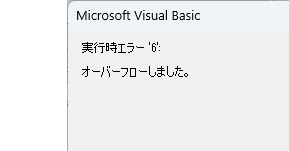
VBA "Overflow occurred." Error cause and remedy (runtime error '6′:)

Cause of ErrorThis error occurs when the data type is not in a format that can be handled, or when the data type exceeds the range of numbers that can be handled. First, let's reproduce the error. As shown in the figure above, we have set up the code to copy the numeric value in cell "B3" to cell "B4".
Excel Macro (VBA)

How to use the variable type "Workbook" Excel(Excel) Macro(VBA)

For other variable types, please refer to Excel (Excel) Macro (VBA) about variable types. First, we will explain the basic usage of the variable type "Workbook".
Excel Macro (VBA)

"How to Create Your First Excel Macro (Beginner’s VBA Guide)

To write a VBA, you start with the "Development" tab, which is not present by default. Click on the File tab, then click on the option...
Excel Functions

How to extract characters before a specific character "LEFT and FIND functions in Excel"

As shown in the figure below, if there is extra data after the string and you want to extract only the string to the left of the extra data, you cannot simply use the LEFT function alone because the number of characters is not constant. Function to extract the left side of the "¥" mark in cell "A2" = LEFT(A2,FIND(...))
Sponsored Links
en_USEnglish
Copied title and URL
