Sponsored Links
Excel Macro (VBA)

[For Beginners] Step-by-Step Guide to Installing SeleniumBasic

This article offers a beginner-friendly, detailed guide to installing SeleniumBasic. Stuck on the installation and thinking about giving up on automation? The truth is, anyone can install it by taking it one step at a time. A professional with 20 years of experience teaching Excel will walk you through the process.
Excel Functions

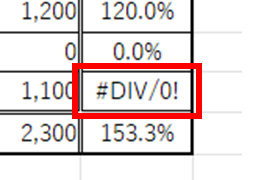
Error display "#DIV/0!" Meaning and Countermeasures Excel

Error messages are unavoidable when dealing with Excel, and you may be surprised when they suddenly appear. If you know the meaning of the error and what to do about it, there is nothing to be afraid of. Meaning of "#DIV/0!
Excel Macro (VBA)

Automatically create invoices from sales invoices3 Excel (Excel)

Continuing from the previous article, "Creating Invoices Automatically from Sales Statements 2: Excel," we will now move on to creating invoices. If you haven't read it yet, please also read "Creating Invoices Automatically from Sales Statements 1: Excel". Putting details on an invoice (using a macro)...
Excel Functions

How to use the Spill function Excel (Excel)

I had neglected the "spill" feature implemented in Microsoft365 and Excel2021 for a while because I didn't really understand it, but when I tried it, I found it to be very useful. I found it to be very useful. Moreover, I thought that I could do a lot of things by applying this function...
Excel Functions

How to paste Excel (Excel) images

There are functions to do various things with images, such as sticking an image on Excel or fitting an image into a cell. In this article, we will introduce two ways to import images into Excel. Place the image on top of a cellOnce you save the image to a folder somewhere on your terminal, you can use this method...
Sponsored Links
en_USEnglish
Copied title and URL